
If you've spent any time around stage lighting, you've heard the term DMX512. It's on every fixture spec sheet, every lighting console, every dimmer pack. But what it actually is — and how it works in practice — isn't always explained clearly.
This is a straightforward explanation for anyone buying, operating, or specifying stage lighting equipment from DMON Lighting or anywhere else.
What DMX512 Actually Is
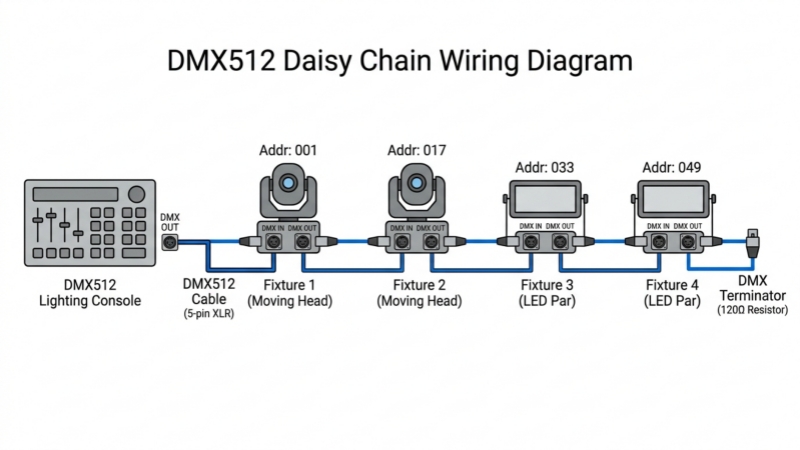
DMX512 is a communication protocol — a standardized language that lighting consoles use to talk to fixtures. The "512" refers to the number of channels the protocol can carry in a single data universe: 512 individual control channels, each with a value between 0 and 255.
Before DMX512 became the industry standard in the late 1980s, manufacturers used proprietary control systems that only worked with their own equipment. A console from one brand couldn't reliably control fixtures from another. DMX512 solved that by giving the entire industry a common language.
Today, every professional stage lighting fixture — moving heads, LED pars, dimmers, fog machines — supports DMX512. If a fixture doesn't have a DMX input, it's not professional equipment.
How It Works: The Basic Concept
Think of DMX512 as a long street with 512 numbered houses. Each house is a channel. Your lighting console sends a value (0–255) to each house simultaneously, hundreds of times per second. Each fixture "lives at" a specific address on that street and listens only to the channels assigned to it.
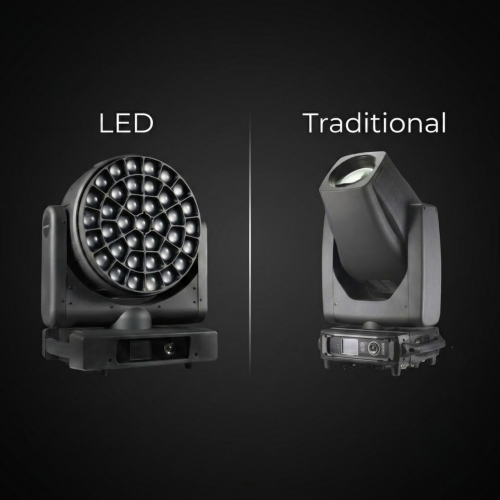
A simple LED par might use 3 channels — one each for red, green, and blue. A moving head light might use 16 or more channels to control pan, tilt, color wheel, gobo, prism, dimmer, strobe, and focus independently.
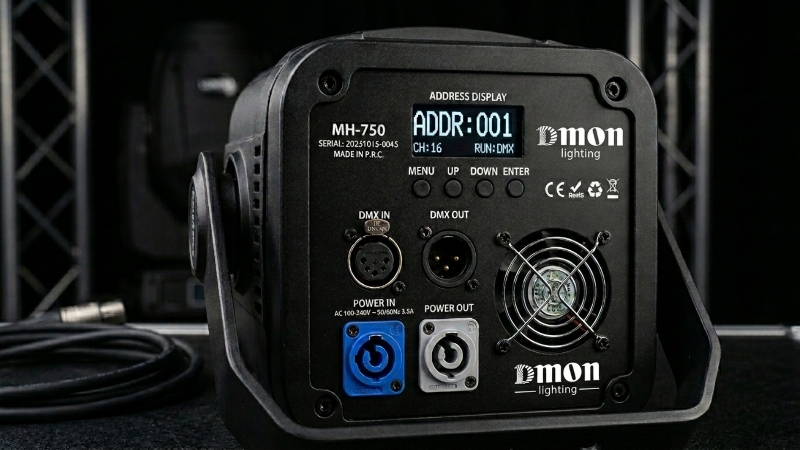
When you set a fixture's DMX start address, you're telling it which house number to start listening from. If your moving head uses 16 channels and you set its address to 1, it listens to channels 1 through 16. The next fixture in your rig should start at channel 17 to avoid overlap.
DMX Wiring: What You Need to Know
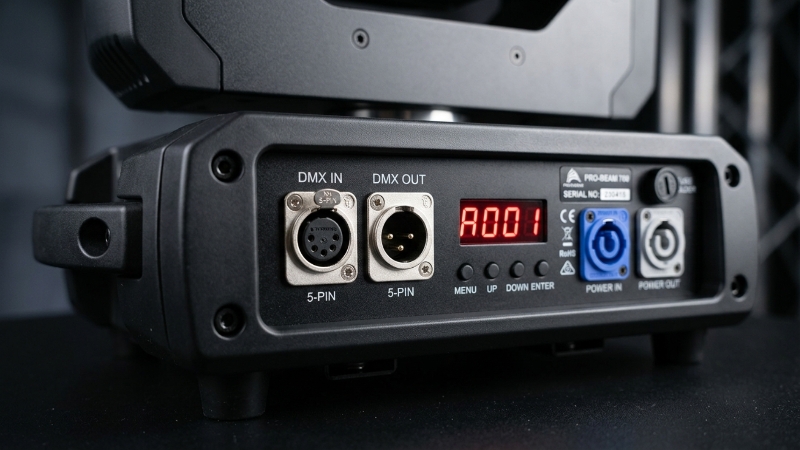
DMX512 runs on a daisy-chain wiring topology. The signal goes from the console to the first fixture, then from that fixture to the next, and so on down the line. Each fixture has a DMX input and a DMX output (or "through") connector for this purpose.
A few practical points that cause problems when ignored:
Use the right cable. DMX512 requires a shielded twisted-pair cable rated for DMX — typically specified as 110-ohm impedance. Standard microphone cable (XLR) is often used as a substitute and works in many situations, but it's not rated for DMX and can cause signal problems over longer runs or in electrically noisy environments. If you're doing a permanent installation, use proper DMX cable.
Terminate the last fixture. At the end of a DMX chain, the signal needs a terminator — a 110-ohm resistor fitted into the last fixture's DMX output. Without it, the signal reflects back down the cable and causes erratic behavior. Many fixtures have a built-in termination switch. If yours don't, use a DMX terminator plug.
One universe = 512 channels. If your rig needs more than 512 channels of control, you need a second DMX universe — a separate cable run from a second output on your console. Most professional consoles support multiple universes. Large touring rigs routinely run 4–8 universes or more.
DMX Addressing: How to Set It Up
Every DMX fixture needs a unique start address within its universe. If two fixtures share the same address, they'll respond to the same commands and behave identically — which is useful if you want them synchronized, but a problem if you don't.
Most moving head lights set their DMX address through an onboard menu display. You navigate to the DMX address setting, enter the channel number you want, and save. Some older or simpler fixtures use a bank of DIP switches — small toggle switches that represent binary values. Each combination of switches corresponds to a specific address number.
Before a show, it's worth keeping a simple record of what address each fixture is set to. It saves significant troubleshooting time when something behaves unexpectedly.
Channel Modes: Standard vs Extended
Most moving head lights offer multiple DMX channel modes — typically a basic mode with fewer channels and an extended mode with more. The difference is resolution and control depth.
In a basic 16-channel mode, pan might be controlled by a single channel giving you 256 positions across the full 540° range. In an extended mode, pan might use two channels — a coarse channel and a fine channel — giving you 65,536 positions for much smoother movement.
For most live events, basic channel modes are sufficient. For broadcast, theater, or any application where subtle, precise movement matters, extended modes are worth the additional channel count.
RDM: The Two-Way Version of DMX
Standard DMX512 is one-directional — the console sends data, fixtures receive it, and nothing comes back. RDM (Remote Device Management) is an extension of the DMX512 standard that adds two-way communication. The full technical specification is maintained by ESTA (Entertainment Services and Technology Association), the body that governs DMX512 standards.
With RDM-compatible fixtures and a console that supports it, you can remotely read fixture information — current DMX address, lamp hours, error status — and even change settings without physically accessing the fixture. For large rigs or fixtures hung in difficult positions, this is a practical time-saver.
RDM support is increasingly standard on professional fixtures. If you're building a long-term rental inventory or a permanent installation, it's worth specifying RDM-compatible equipment from the start.
The Bottom Line
DMX512 is the backbone of professional stage lighting control. Understanding how addressing works, how to wire a chain correctly, and what channel modes mean will save you hours of troubleshooting on-site and help you make better decisions when specifying equipment.
Check what channel modes are available, whether the fixture supports RDM, and how the address is set — onboard display is significantly easier to work with than DIP switches, especially when you're addressing 20 fixtures in a hurry before a show. If you have questions about how our fixtures handle DMX configuration, feel free to get in touch.
Frequently Asked Questions
What does DMX512 stand for?
DMX512 stands for Digital Multiplex with 512 channels. It is a standard communication protocol used in the entertainment industry to control stage lighting fixtures, dimmers, and other equipment from a single console.
How many fixtures can you run on one DMX universe?
A single DMX universe carries 512 channels. How many fixtures that supports depends on how many channels each fixture uses. A moving head light using 16 channels allows up to 32 fixtures per universe. A simple LED par using 3 channels allows up to 170 fixtures. When you run out of channels, you add a second universe from a second console output.
Can I use a regular XLR cable for DMX?
XLR cable is commonly used as a substitute for DMX cable and often works in short runs. However, proper DMX cable is rated at 110-ohm impedance, which standard microphone XLR cable is not. For permanent installations or runs longer than 30 meters, use cable specified for DMX to avoid signal problems.
What is the difference between DMX512 and RDM?
DMX512 is a one-way protocol — the console sends commands to fixtures, but receives no information back. RDM (Remote Device Management) is a two-way extension of DMX512 that allows a compatible console to read fixture data such as DMX address, lamp hours, and error codes, and to change fixture settings remotely without physical access to the unit.
Why is my DMX fixture behaving erratically?
The most common causes are: overlapping DMX addresses between fixtures, a missing terminator at the end of the DMX chain, incorrect cable type causing signal degradation, or a damaged DMX cable. Check address settings first, then verify termination, then inspect the cable run.
DMON Lighting has been manufacturing stage and event lighting equipment in Guangzhou, China since 2009. We supply distributors, rental companies, and venue contractors across the Middle East, Southeast Asia, Brazil, and Australia.